This content is unavailable. Please contact customer service for more information.
Already a subscriber? Login or Activate your account.
You've reached the end of the standard E-Edition.
This content is unavailable. Please contact customer service for more information.
Tool helps report non-emergency issues
FROM STAFF REPORTS
The new app replaces the concord Mobile care app. This is for
nonemergency issues.
CITY OF CONCORD
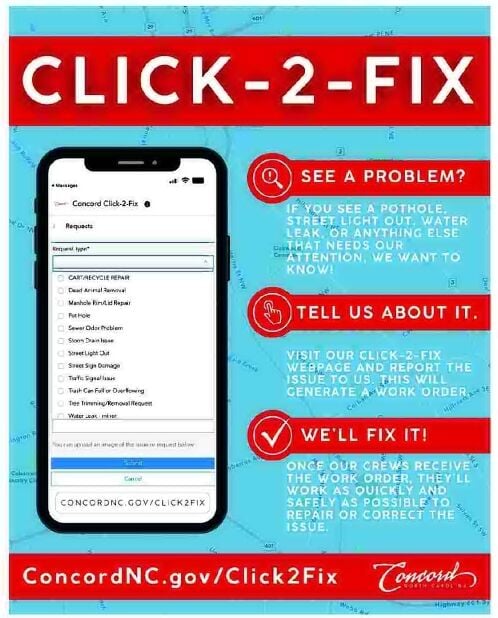
The city of Concord is introducing a new way for residents to easily report non-emergency issues like potholes, street sign damage, streetlights that are out and more. The new Concord Click-2-Fix is a free online reporting tool that replaces the former Concord Mobile Care application.
With Concord Click-2-Fix, residents have a faster and more convenient way to report a problem. Previously, with Concord Mobile Care, residents were required to create a username and password and log in before reporting an issue. It was also primarily an app-based program that required users to download it to their phones. Now, with Click-2-Fix, residents simply go online from any device and can quickly and anonymously report a non-emergency issue. No more forgotten passwords and additional steps necessary to request assistance.
When developing the new Click-2-Fix tool, the city was also mindful to keep the features users liked about the old system, such as a map to pinpoint the exact location of the issue and the ability to upload images. After a resident submits a report through Concord Click-2-Fix, a ticket is automatically generated and routed to the appropriate city department to resolve and correct the problem. Users also have an option to share their information and receive a confirmation email along with a ticket number for easy tracking of their request.
The Concord Click-2-Fix reporting tool is available at ConcordNC.gov/Click2Fix. Anyone who previously downloaded the Concord Mobile Care app can delete it from their phones as it is no longer supported.
Page A2
CORRECTIONS
CORRECTIONS: The Independent Tribune wants to promptly correct any erroneous or inaccurate information published. Email corrections to Mark Plemmons at mplemmons@independenttribune.com.
Click and hold your mouse button on the page to select the area you wish to save or print.
You can click and drag the clipping box to move it or click and drag in the bottom right corner to resize it.
When you're happy with your selection, click the checkmark icon next to the clipping area to continue.